One-Page Resume Format — Sample + How to Fit It
For freshers and anyone with under five years of experience, one page is the sweet spot. It forces you to keep only what matters — and recruiters thank you for it.
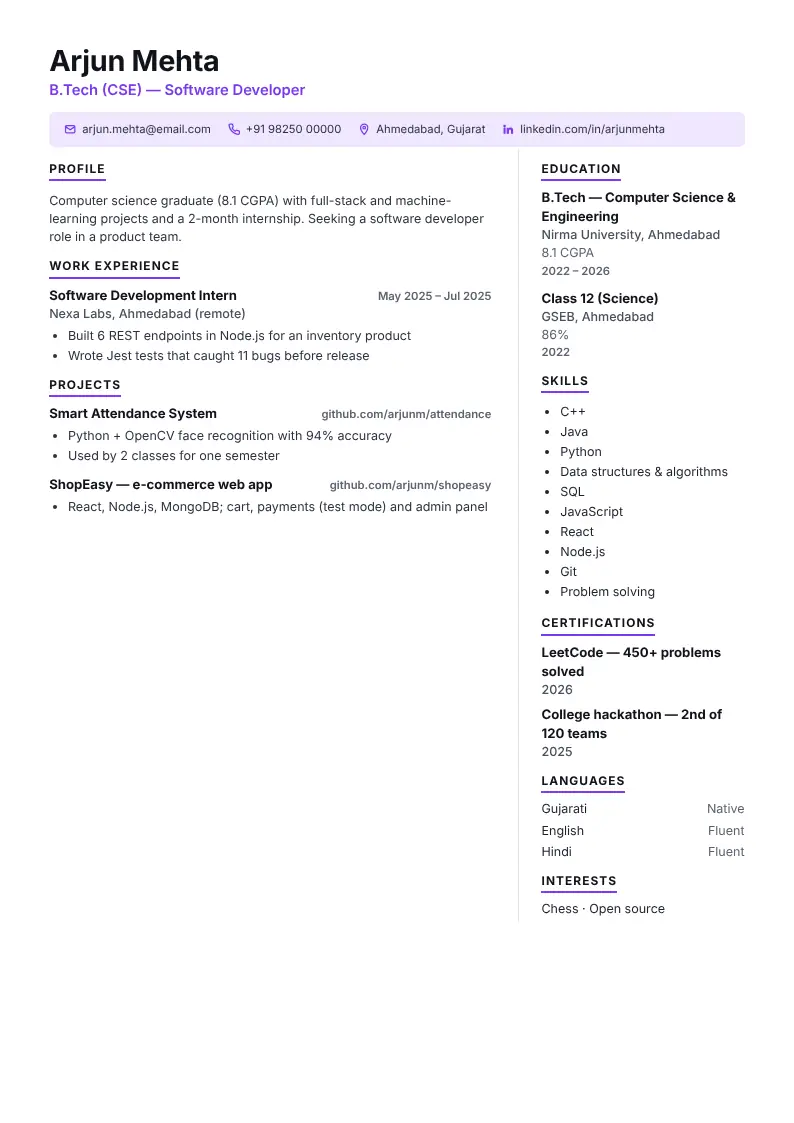
Format: section by section
- Header in one lineContact details on a single line or bar.
- 3-line profileNo more.
- Experience / projects3–4 bullets each.
- EducationOne line per qualification.
- SkillsOne line or chips.
- Sidebar (optional)Two-column designs fit more.
Seven ways to fit your CV on one page
- Cut the objective to 2–3 lines.
- Keep only the last 2–3 jobs or the best 2–3 projects.
- Use 3–4 bullets per job, each under two lines.
- Drop "References available on request" and hobbies that add nothing.
- Use a two-column design like Compact or Modern.
- Reduce spacing before reducing font size.
- Use the Fit to one page button in CV Dost — it shrinks spacing and text step by step until it fits.
When two pages is fine
With 7+ years of experience, senior roles, or government applications that ask for detailed information, two pages are acceptable. Never go beyond two unless it is an academic CV.
Type once, see your CV in 10 designs
Open CV makerDownload as PDF, Word or image. Your details stay on your device.
Frequently asked questions
Should my resume be one page?
Yes, if you are a fresher or have under five years of experience. Senior professionals can use two pages.
How do I make my resume fit on one page?
Shorten the profile and bullets, keep only recent roles, use a two-column design, then use Fit to one page in the CV maker.
Does a smaller font help?
Only a little — keep body text at 9 pt or larger. Reducing spacing is usually better.