Biodata Format for Government Job — Sample + Template
Government departments, PSUs, municipal bodies and contractual posts often ask for a biodata or CV in a traditional Indian format: photo box, father's name, date of birth, an education table with marks, and a signed declaration. The Indian Format design in CV Dost follows exactly this layout.
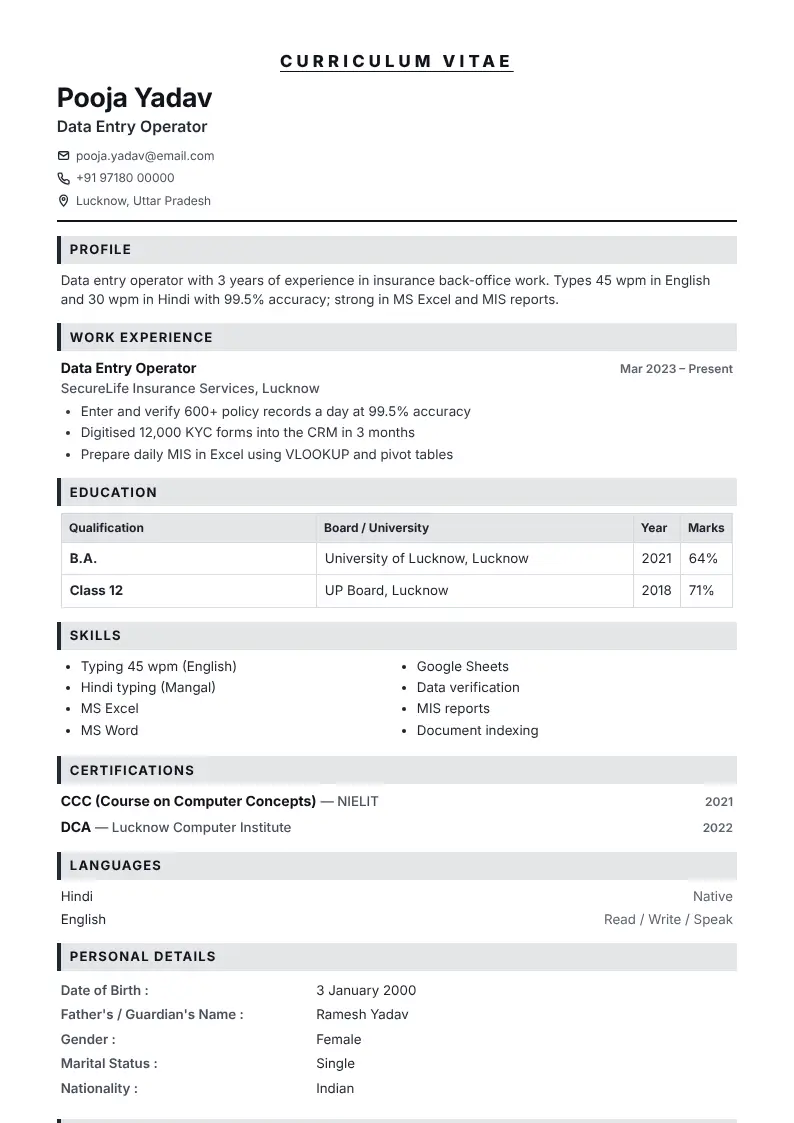
What a government-job biodata must have
- Passport-size photo in the top-right box.
- Full name as on certificates, father's/guardian's name, date of birth, gender, category if asked, nationality.
- Education in a table: qualification, board/university, year, marks.
- Experience with dates (month and year).
- Typing speed and computer certificates (CCC, DCA) where relevant.
- Declaration with place, date and signature.
Always follow the notification
Every recruitment notification has its own instructions. If the notification gives a format or application form, follow it exactly — the biodata here is for posts that ask for "biodata/CV with documents" without a fixed form.
Add your signature digitally
In the CV maker, open Interests, declaration & signature, then upload a photo of your signature or draw it with your finger. The background is removed automatically.
See your biodata in all designs as you type
Open CV makerDownload as a JPG for WhatsApp or a PDF for printing.
Frequently asked questions
What is the format of a biodata for a government job?
Photo, personal details (name, father's name, DOB, gender, nationality), an education table, experience, skills, languages, and a signed declaration with place and date.
Should I write my category on the biodata?
Only if the notification asks for it. Otherwise it is not needed.
Can I make it in Hindi?
Yes. In the CV maker, choose हिंदी under Design & layout → Section headings language.